jqBarGraph – jQuery graph plugin
jqBarGraph is jQuery plugin that gives you freedom to easily display your data as graphs. There are three types of graphs: simple, multi and stacked. All you have to do is to pass your data to this plugin. This plugin is compatible and fully tested with Safari 2+, Internet Explorer 6+, Firefox 2+, Google Chrome 3+, Opera 9+.
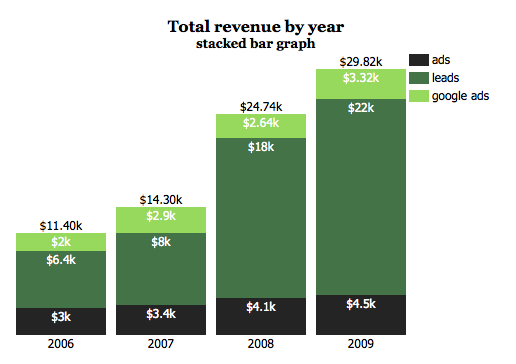
Of course, there are a lot of settings to tune appearance of your graph, as are animation, color scheme, dimensions etc. Also, you can additionally change look and feel of graph via CSS.
You will need jQuery in order to make jqBarGraph working. First, you need to download jQuery and jqBarGraph plugin and include them on your page. Similar to this:
<script src="js/jquery.js" type="text/javascript"></script> <script src="js/jqBarGraph.js" type="text/javascript"></script>
Now, we need array of data from which we want to create graph. There is two type of data array for jqBarGraph. First is for simple bar graph type, and second is for multi and stacked bar type.
For simple bar graph type data for one bar should look like this: [value, label, color]. Label and color are optional. This is example for simple bar graph type:
arrayOfData = new Array( [10.3,'Jan','#f3f3f3'], [15.2,'Feb','#f4f4f4'], [13.1,'Mar','#cccccc'], [16.3,'Apr','#333333'], [14.5,'May','#666666'] );
For multi and stacked type of graph you should send data in next format: [[value1, value2, value3, ..., valueN], label]. It should look similar to this:
arrayOfData = new Array( [[14,54,26],'2007'], [[8,48,38],'2008'], [[4,36,57],'2009'] );
After you set your data array you just need to say in which div you want graph to be created. All you have to do is:
$('#divForGraph').jqBarGraph({ data: arrayOfData });
The code above is enough to display your data as bar graph. But if you want to made your graph prettier you can achieve that with next set of parameters:
data: arrayOfData, // array of data for your graph
title: false, // title of your graph, accept HTML
barSpace: 10, // this is default space between bars in pixels
width: 400, // default width of your graph
height: 200, //default height of your graph
color: '#000000', // if you don't send colors for your data this will be default bars color
colors: false, // array of colors that will be used for your bars and legends
lbl: '', // if there is no label in your array
sort: false, // sort your data before displaying graph, you can sort as 'asc' or 'desc'
position: 'bottom', // position of your bars, can be 'bottom' or 'top'. 'top' doesn't work for multi type
prefix: '', // text that will be shown before every label
postfix: '', // text that will be shown after every label
animate: true, // if you don't need animated appearance change to false
speed: 2, // speed of animation in seconds
legendWidth: 100, // width of your legend box
legend: false, // if you want legend change to true
legends: false, // array for legend. for simple graph type legend will be extracted from labels if you don't set this
type: false, // for multi array data default graph type is stacked, you can change to 'multi' for multi bar type
showValues: true, // you can use this for multi and stacked type and it will show values of every bar part
showValuesColor: '#fff' // color of font for values
This graph will work without any additional CSS, but it can easily be styled via CSS. I was paying attention that you will have enough selectors to achieve anything you want with CSS. If you create something cool it will be nice if you share that with all of us.
Changelog
1.1
* Compatibility with jQuery 1.4.2+
Comments [ 126 Comments ]
» Trackbacks and pingbacks click to expand
-
[...] is jqBarGraph on steroids. It have almost all jqBarGraph possibility, plus some new features, like url bars, info [...]
-
[...] jqBarGraph (for jQuery) [...]
-
[...] jqBarGraph – jQuery graph plugin [...]
-
[...] jqBarGraph (за jQuery) [...]
-
[...] Descarga | jqBarGraph [...]
-
[...] jQuery framework Demo: http://www.workshop.rs/jqbargraph/ Website: http://workshop.rs/2009/12/jqbargraph-jquery-graph-plugin/ License: GPL [...]
-
[...] jqBarGraphl [...]
-
[...] Great looking bar graphs with jQuery. Learn more about it here. [...]
-
[...] 6 +, Firefox 2 +, Google Chrome 3 +, Opera 9 + Demo: http://www.workshop.rs/jqbargraph/ Tutorial: http://workshop.rs/2009/12/jqbargraph-jquery-graph-plugin/ Licenza: GPL [...]
-
[...] jqBarGraph (for jQuery) [...]
-
[...] jqBarGraph. Graphs are a great way to present data and thanks to jqBarGraph now you can display graphs with jQuery. Currently the plugin supports only three types of graphs: simple, multi and stacked but for many situations this is just what you need. The jqBarGraph plugin works under all major browsers. [...]
Leave a Reply
More Articles
-
Bigshark – larger buttons on Grooveshark
GrooveShark is one of the web services which I’m using on daily basis. Actually, I have one computer which I use only to play music from my GrooveShark playlists, while I’m sitting on couch. But problem is when I want to skip or pause some song. I have to get up because I can’t hit [...]
-
Visualize Twitter connections with Twings
I always find it interesting to see who from people that I’m following on Twitter follows me back and also to see how those people are related with each others. I was looking the best way to present that visually and presenting connections as dots and put those dots in rings sounds like a good [...]
-
Coin Slider 4 WordPress
Coin Slider 4 WP will show your featured posts as image slider and rotate them using unique effects provided by jQuery’s Coin Slider.
Implementation is very easy, after you download and activate this plugin, just paste one line of code in your template and Coin Slider 4 WP is ready to use.
Demo pagesee how it worksDownloadtry [...]
-
HTML5/CSS3 Circle Music Player
More then a year ago my very talented designer friend Jovan Stanojevic presented me idea of Circle Music player which will play local .mp3 files. This is his original idea, but after we start to work on this a few things were changed.
[He have more great designs which you'll see if you go to his [...]


February 10, 2013
your bar chart does not work with jquery 1.8 +
February 18, 2013
Your bar graph is not working with jquery 1.8+ and is giving error. Kindly update the plugin so that it will work with latest jquery versions.
Anyways, thanks for sharing your work.
February 18, 2013
Version 1.1 from April 2011 is compatible with jQuery 1.8+
February 19, 2013
I constantly spent my half an hour to read this weblog’s articles all the time along with a cup of coffee.
March 5, 2013
Its a great graph and working with all latest versions of jQuery.
How can I add x and y axis which showing range of values. For example say Y-axis is showing 0, 10, 20,….. ,100.
Or if you have other library to add such axis.
Thanks
April 9, 2013
I’ve been working with your plugin and I’ve updated it with the ability for your graphs to be animated upon data updates to the graph. So now instead of redrawing a new graph that starts from the bottom and goes to your new heights, it now goes from your previous height values up or down to the new height values. I’ve also added in an option to allow you to override the max height of a bar encase you needed to show for blank space. Let me know if you would be interested in looking at the updated code and some samples of the implementation. Anyways Great Work on this plugin and thank you for releasing it to the community.
April 12, 2013
in the stacked chart, is there a way to not have the total be displayed (ie section 1 is 4, section 2 is 6, section 3 is 10, 20 shows at top, but don’t want it there) – can this be done? Also, Erdrick – your idea sounds like something I was looking for.. an this be shared? I’m at mvanmeter@gmail.com
April 16, 2013
Not working with jquery-1.6.1.js , btw., great plugin!
April 17, 2013
k Mike, sent you an e-mail with some samples and updated code. Let me know if you get it or not
April 19, 2013
@Erdrick you can send me pull request at github and I’ll be glad to check
April 19, 2013
Hi there,
I love the simplicity of this plugin.
I was just wondering if it is possible to slightly rotate the x-labels? In my diagram they are so long that some require a second row which destroys the diagram.
I would really appreciate your help.
If there is no simple way of doing it, what would be the complicated way?
Thank you!
Lucas
April 23, 2013
I’m not sure how to do a pull request and i don’t have a github account, but i can email you a zip file of the updated code and examples if you like.
April 29, 2013
Hi,
I am using a code which is below, but the graph is not getting generated. Please provide inputs on to where i am going wrong.
function GenerateGraph() {
var arrValue = “”;
$(’td.ms-vb2′).filter(function (i) {
if ($(this).html().indexOf(’Sum=’) > 0) {
mystring = $(this).html();
var result = /\d+(?:\.\d+)?/.exec(mystring);
//console.log(arrValue)
arrValue = result[0] + “,” + arrValue
}
});
var n = arrValue.split(”,”);
document.getElementById(”value1″).innerHTML = arrValue;
debugger;
var y1 =n[0];// value of n[0] here is 120
var y2 = n[1]; value of n[0] here is 150
var x1 = “Resource”;
arrayOfDataMulti = new Array(
[[y1, y2], x1]
);
$(’#divForGraph’).jqBarGraph({
data: arrayOfDataMulti,
type: ‘multi’,
colors: ['#0f0','#F00']
});
}
Here when i give the direct value to Y1 and Y2, the graph is getting generated on the page, but when i use this code, it gives nothing. Not even an error.
Thanks,
May 5, 2013
where should i place jqBarGraph jquery plug-in after downloading