Google Buzz ER: Google Buzz for Wordpress
Yesterday Google announced new service, Google Buzz, a new way to share updates, photos, videos and more, and start conversations about the things you find interesting. Today you can have Google Buzz posts on your WordPress site.
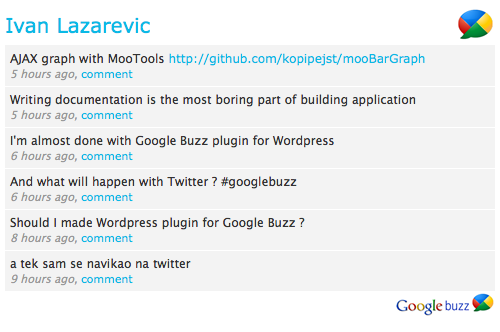
Google Buzz Er is Wordpress plugin for showing public Google Buzz posts for selected Google account. All you have to do is to set Google account username and optionally number of posts. From 1.2 version Google Buzz Er have sidebar widget.
Features
* Custom title
* Showing images from post
* Sidebar widget
* Custom color scheme
How to install
In header of your site add following line of code:
<?php include (ABSPATH . '/wp-content/plugins/google-buzz-er/google-buzz-er.php'); ?>
1. Upload google-buzz-er to the /wp-content/plugins/ directory
2. Activate the plugin through the ‘Plugins’ menu in WordPress
3. Drag widget on your sidebar – or -
On place where you want Google Buzz ER to be shown put:
<?php GoogleBuzzEr(); ?>
After that go on Google Buzz ER settings page and set your Google account username (without ‘@gmail.com’) . It’s simple like that.
Changelog
1.1
* Sorting posts by publishing time
1.2
* Added sidebar widget feature
* Removed include for header section
1.3
* Custom title in header
* Option for showing images from posts
* Width for images from posts
1.4
* Using curl for getting Google Buzz data
* Check if there are posts
* Set box, posts, links color from admin page
* Choose if Google Buzz logos will be displayed
Comments
Leave a Reply
Trackbacks and pingbacks
click to expand
-
[...] Info | Preview | Download AKPC_IDS += "260,"; (No Ratings Yet) Loading … [...]
-
[...] (以上介绍 via) [...]
-
[...] Wordpress之Google Buzz插件 2010年2月11日 a-duo 跳到评论 早上发现的这个插件,当时是1.0版本,只是捣鼓半天没有成功,显示“Error loading Google Buzz data!”,晚上的时候发现已经升级成1.0版本了,到作者博客上一看,好像有个不会注意的地方出错了,用户名其实不需要‘@gmail.com’,改过来之后顺利显示。没想到很快就发现有汉化版本了,请看这里,博主有多种演示。 点点滴滴 google buzz, wordpress [...]
-
[...] è già stato sviluppato! Se invece volete importare sul vostro blog i vostri buzz allora il plugin giusto è questo. In attesa che google porti il suo nuovo GBuzz su Google App Premiere, da ieri stiamo sperimentanto [...]
-
[...] Google Buzz ER: Show your Google Buzz post on your Wordpress site. Just set you username and place where you want your Google Buzz posts to be shown. [...]
-
[...] el segundo lo hemos encontrado ha sido ‘Google Buzz ER’ de workshop.rs y que aparece ya publicado en Wordpress [...]
-
[...] Google Buzz ER – A WordPress-plugin for displaying your Buzz-feed anywhere on your blog [...]
-
[...] Mai multe informați găsiți și aici. [...]
-
[...] http://workshop.rs/2010/02/google-buzz-er-google-buzz-for-wordpress/ espero que los blogs no se ensucien con este plugin – Google Buzz # [...]
-
[...] 作者:http://workshop.rs/2010/02/google-buzz-er-google-buzz-for-wordpress/ 小贴士:插件安装完后,在后台用户名栏直接输入abc就行,不要如入abc@gmail.com,否则信息不会显示。 [...]
-
[...] found three wordpress add-ons. Each work a little differently. Google Buzz Widget and Google Buzz ER both allow you to add your Buzz feed as widgets. One of them is a little more "decorated" [...]
-
[...] Google Buzz ER est un plugin vous permettant d’afficher les “Buzz” de votre compte Google. Pour cela il vous suffit simplement de renseigner votre nom d’utilisateur Google et d’y insérer le module via l’onglet “Widget” de votre thème WordPress ou via la fonction php donnée. Les publications sont affichées du plus ancien au plus récent. Il affiche l’heure (ou la date) à laquelle le “Buzz” a été publié, le titre du “Buzz” et un lien “Commentaire” pour commenter la publication. [...]
-
[...] Уже и плагин для Wordpress сделали: http://workshop.rs/2010/02/google-buzz-er-google-buzz-for-wordpress/ [...]
-
[...] Bien évidemment, il est possible d’en faire de même pour Google Buzz, et ce au travers d’un plugin dédié : Google Buzz ER. [...]
-
[...] Google Buzz ER von Ivan Lazarevic zeigt Google Buzz Einträge im WordPress Blog an. [...]
-
[...] Google Buzz ER 1.2 – Displays your Google Buzz post on your Wordpress driven site. You can use it as a sidebar widget or directly in your posts or pages. There seems to still be a few bugs to work out, but most of the errors are users who enter their Google Account username with a “@gmail.com”. Ivan suggests that you leave that part off and it should work. By Ivan Lazarevic. [...]
-
[...] w postaci dodatków do Wordpressa? Proszę bardzo – pierwszy z brzegu to Google Buzz-er. Standardowa instalacja i dwie opcje w konfiguracji czyli podanie nazwy profilu oraz ilości [...]
-
[...] Google Buzz ER – Easy to set up and add a widget that can be dropped in your sidebar to show the latest buzz from your feed. Very easy to use and easy to configure. [...]
-
[...] Google Buzz ER – Zeigt Google Buzz Einträge im Blog [...]
-
[...] Link: http://workshop.rs/2010/02/google-buzz-er-google-buzz-for-wordpress/ [...]
-
[...] Link: http://workshop.rs/2010/02/google-buzz-er-google-buzz-for-wordpress/ [...]
-
[...] google buzz ER [...]
-
[...] Google Buzz ER for WordPress by Ivan Lazarevic shows your Google Buzz posts on your Wordpress Blog. Set you username and the location in your Blog, where you want your Google Buzz posts to be shown. The Features are: Custom title, Showing images from post, Sidebar widget, Custom color scheme. [...]
-
[...] 首先你需要这个插件 Google Buzz ER 或者这个 Google [...]
-
[...] varios resultados. Instalé tres distintos, y tras probarlos, el que más me convenció fue Google Buzz ER. Me decanté por éste porque no sólo se veía mejor que los otros plug-in’s sino que puedes [...]
-
[...] use Buzz primarily to share items of interest from Google Reader. I use a WordPress plugin called Google Buzz ER to share my latest Buzz in this blog. You’ll see the attractive widget in the sidebar, with [...]
-
[...] – ‘Google Buzz ER’ de workshop.rs [...]
February 10, 2010
Error loading Google Buzz data!
February 10, 2010
Same. This is lame.
February 11, 2010
it works for me guys…
no problems at all!
February 11, 2010
I also have error message “error loading google buzz data”
How Can I fix to it?
February 11, 2010
Did you try to set your username without ‘@gmail.com’ ?
February 11, 2010
It’s ok when set username without ‘@gmail.com’ !
Thanks!
February 11, 2010
I couldn’t work, when i remove username without ‘@gamil.com’
show same error message.
is Google buzz account problem?
I’m waiting for few day…
thanks you
February 11, 2010
@a-duo
It looks nice on your blog.
@karistuck
As you can see here http://test.96.rs/ everything works fine with your username. I just put karistuck in username field on Google Buzz Er settings page.
February 11, 2010
I use Atahualpa theme. I would like to put Google Buzz on the left or right bar. Where should I paste the code
When I pasted the first code
in header area via Editor in the theme, I just put it anywhere in it. (In fact under . Is that ok?
At the moment I’ve got “error loading google buzz data” although I have already amended the Gmail Username without @gmail.com
Thanks for your help.
February 11, 2010
Can you check what you get on http://www.google.com/profiles/your_username ? When I try with your gmail username that you left here I getting error page.
February 11, 2010
Hello, and many thanks for your work.
I get the following, wherever I put the first line”" If it is in the “header” file, at the beginning. If it’s the header for a specific sidebar, it is shown at this point.
Parse error: syntax error, unexpected T_STRING, expecting T_OLD_FUNCTION or T_FUNCTION or T_VAR or ‘}’ in /homez.139/mysite/www/wp-content/plugins/google-buzz-er/google-buzz-er.php on line 9
Do you know what is wrong from my side?
Many thanks
February 11, 2010
Which version on PHP server where your site is hosted ? You must have PHP5.
February 12, 2010
@Lazarevic Ivan thanks for my account demo, um, I’ll check my web hosing
thanks Lazarevic Ivan~
February 12, 2010
it’s good.
February 12, 2010
is there any way to load pictures included in shared posts? I share a lot of google reader stufff and pix are pretty fundamental here…
great work dude
February 12, 2010
one more IMPORTANT thing – it would be very nice, if buzz notes were included into rss feed of wordpress…
February 13, 2010
you have to have your google profile configured for this to work
go here to setup
http://www.google.com/support/accounts/bin/answer.py?answer=97703&hl=en
February 13, 2010
I have “error loading google buzz data” too.
My username is “yvonnelin.net”, and I have set it without “@gmail.com”
Do you think it happened because of the “.” ?
February 13, 2010
@Yvonne:
i have a google username with “.” and the plugin works perfectly for me, so this is not the case. At least with my 2.9.1 wordpress version.
February 13, 2010
Oh~ I have traced the cause of the problem.
I didn’t save my profile URL.
Thank you!
February 13, 2010
another wp plugin: http://arpitshah.com/plugins/wp-google-buzz/
February 14, 2010
@eof
Unfortunately Google Buzz API doesn’t support shared images yet. Regarding your second suggestion, I’ll see what I can do.
Thanks for sharing your ideas
February 14, 2010
A great plugin in a short period of time. I’m impressed.
If you’ll be continuing to work on this, one thought might be to add some more display options in the settings. I was able to manually change some of the font sizes and colors in the coding, along with the “title” displayed (having my name for the title seems redundant), but a lot of folks don’t have that ability. It’d also be nice not to have to redo those changes every time you upgrade the plugin (I’ve not redone them on my site since your last upgrade).
You wouldn’t need to go quite so far, but I’ve always really appreciated the customization of plugins like WPaudioplayer.
February 15, 2010
Great plugin and works a charm, it would be nice to expand the admin editing options for the plugin to include font colours for links and images.Looking forward to your next update.
February 15, 2010
I’m excited by the potential for this plugin for a ‘lifestream feed’ on my blog page. Try as I might, however (read all the comments above, deactivated then reactivated the plugin/widget etc.) I continue to get the error message: “error loading google buzz data” … frustrated! Any thoughts out there? Yes, my Google user name is correct, and has been inserted without the “@gmail.com”
Perhaps it’s another plug-in on my site causing the issue … though there is not the usual php error when this happens.
February 16, 2010
I’m having problems getting it to work,
My profile is fine, however no matter what I try, it gives the same old “Error getting data” message.
Thanks anyway!
February 16, 2010
Nice work! Can you import in this widget also some media from Buzz? Images and video, for example. Like here: http://fieldjournal.co.uk/?p=189 . Thanx.
February 16, 2010
@Michael Livingston @Bill Masson @Zhilinsky
Thanks for suggestions, guys. Some of them will be implemented in next release.
@Kate Foy @Jason
Check smurftech’s comment above, maybe that will help you.
February 16, 2010
Pretty awesome! I gave it a big spot up front on my blog!
I wish it were easier to customise though, I’m having some trouble with it right now. It’d be great if you could include some colour options and stuff like that in the settings page.
Great work though!
February 16, 2010
By the way, how come the code for it goes everywhere except ? I don’t think it really matters, but I was just curious.
(Wish I could edit posts.)
February 17, 2010
Great! Images import In version 1.3
Hm… Seems like import of links are not always working.
February 17, 2010
nice, thanks for this
February 17, 2010
Can you please address why the error is appearing – seems I’m not alone in my issues. Looks simple enough but it’s not.
Entered user name without gmail bit. How hard can this be?
Argh!!
February 17, 2010
OK, it’s all down to saving your profile on google buzz. Wow looking good once it does wok!! Cheers Sx
February 18, 2010
Thanks for doing this widget.
Any plans to make this work on WPMU? Doesn’t work yet cause WPMU doesn’t have the options.php in the wp-admin folder. Will just get a “Error! Options page not found.”
February 18, 2010
@ Lazarevic Ivan
All working on your 1.3 update!
However, when I post an image.. it only shows the text comment, and not the image itself.
Is this done on purpose, or is it a bug do you know?
Thanks again.
February 18, 2010
Apologies, I didn’t read the changelog
Ignore my retarded post.
February 18, 2010
man, everything was working fine till i upgraded to 1.3… now i keep getting, for each buzz:
Warning: GoogleBuzzEr_Start::gb_getData() [function.GoogleBuzzEr-Start-gb-getData]: Node no longer exists in s/wp-content/plugins/google-buzz-er/google-buzz-er-content.php on line 95
what am i doing wrong? everything is set perfectly on the configuration… am i missing something? i have also removed the code that was previously in the HEAD… please help me!
February 18, 2010
Hi Again
Your buzz plugin is really cool but I keep getting:
Error loading Google Buzz data!
Can you help please?
Thanks
February 18, 2010
@deacon
Sorry, no plans for WPMU for now.
@maurizio
Can you please un-check Show Images and tell me if you still getting warning ?
@Jose
I test it with your gmail username and it works fine as you can see here http://test.96.rs/ . Did you enter your username without @gmail ?
February 18, 2010
Hi
Thanks for your answer.
I can see it works on your test page.
I did enter my username withouth @gmail from the beggining.
I keep getting Error loading Google Buzz data!
I’ll wait for your next upgrade…
Thanks again
February 19, 2010
Google Buzz can also be used to make money on the internet like halnnya Twitter and Facebook.
February 20, 2010
Hi Ivan
if i uncheck the “show images” option, then it works, but of course it doesn’t show the images… do you know why?
February 21, 2010
Error loading Google Buzz data!
my username “huangda1982”
February 22, 2010
@maurizio
You can see Google Buzz Er with your username on http://test.96.rs and it works OK. I’m not sure why you have a problem and is very hard to resolve if I can’t reproduce.
@huangda1982
Your account also works for me. I think that your host doesn’t support SimpleXML and you should check that with them.
February 22, 2010
@Lazarevic Ivan
you are right, my host doesn’t support SimpleXML, it doesn’t support get_file_contents and fopen as well.
i am using in this way,
==============================
//$xml = @simplexml_load_file($this->T_URL.$user.”/public/posted”);
$url = $this->T_URL.$user.”/public/posted”;
$curl = curl_init( $url );
ob_start(); // use output buffering so the contents don’t get sent directly to the browser
curl_exec( $curl ); // get the file
curl_close( $curl );
$data = @ob_get_contents(); // save the contents of the file into $file
ob_end_clean(); // turn output buffering back off
$xml = @simplexml_load_string($data);
==============================
and it is working for me now.
thank you, again, it is a good plugin.
February 22, 2010
damn.. i have also uninstalled the plugin and installed it back but i still get the same error… don’t know what to do!
February 22, 2010
this problem ooccurs when the username is changed. I have two usernames luizaqui and luizaquinodiniz
The first work fine while the second not work. The error message are >>
Warning: Invalid argument supplied for foreach() in /home/workadm/public_html/site/wp-content/plugins/google-buzz-er/google-buzz-er-content.php on line 109
Warning: array_multisort() [function.array-multisort]: Argument #1 is expected to be an array or a sort flag in /home/workadm/public_html/site/wp-content/plugins/google-buzz-er/google-buzz-er-content.php on line 113
Warning: Invalid argument supplied for foreach() in /home/workadm/public_html/site/wp-content/plugins/google-buzz-er/google-buzz-er-content.php on line 134
February 22, 2010
@huangda1982
That’s a good idea. I should use curl in case that simpleXML fail. That will be good feature for future release. Thanks.
@maurizio
I still can’t reproduce that error, but I’m trying…
@Luiz Aquino
It works for both. As I see on your site you’re using luizaquinodiniz. Probably the problem was because you didn’t have any Google Buzz post for that account. I should handle that and add appropriate message for that case in future.
February 24, 2010
Hey, it’s really nice work. I have a problem the time of the buzz message doesn’t seem to be right how can i make it right?