Yesterday Google announced new service, Google Buzz, a new way to share updates, photos, videos and more, and start conversations about the things you find interesting. Today you can have Google Buzz posts on your WordPress site.
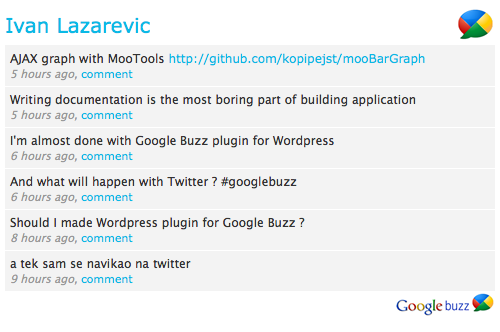
Google Buzz Er is WordPress plugin for showing public Google Buzz posts for selected Google account. All you have to do is to set Google account username and optionally number of posts. From 1.2 version Google Buzz Er have sidebar widget.
Features
* Custom title
* Showing images from post
* Sidebar widget
* Custom color scheme
How to install
In header of your site add following line of code:
<?php include (ABSPATH . '/wp-content/plugins/google-buzz-er/google-buzz-er.php'); ?>
1. Upload google-buzz-er to the /wp-content/plugins/ directory
2. Activate the plugin through the ‘Plugins’ menu in WordPress
3. Drag widget on your sidebar – or –
On place where you want Google Buzz ER to be shown put:
<?php GoogleBuzzEr(); ?>
After that go on Google Buzz ER settings page and set your Google account username (without ‘@gmail.com’) . It’s simple like that.
Changelog
1.1
* Sorting posts by publishing time
1.2
* Added sidebar widget feature
* Removed include for header section
1.3
* Custom title in header
* Option for showing images from posts
* Width for images from posts
1.4
* Using curl for getting Google Buzz data
* Check if there are posts
* Set box, posts, links color from admin page
* Choose if Google Buzz logos will be displayed
I did as you said, I also sent you a mail and a buzz with no response. I will probably now remove your plugin. Thanks for the short time it worked.
Is this plugin still working for latest WordPress 3.0.1?
Getting this error…. any ideas?
Parse error: syntax error, unexpected T_STRING, expecting T_OLD_FUNCTION or T_FUNCTION or T_VAR or ‘}’ in /content/StartupHostPlus/m/o/moneill.net/web/wh/wp-content/plugins/google-buzz-er/google-buzz-er-content.php on line 55
I get an errormessag trying to aktivate buzz er on wordpress 3.0.1
Parse error: syntax error, unexpected T_STRING, expecting T_OLD_FUNCTION or T_FUNCTION or T_VAR or ‘}’ in /WWWROOT/61566/htdocs/wp-content/plugins/google-buzz-er/google-buzz-er-content.php on line 55
Hey,
Very nice plugin, I was looking for something like this. Two small remarks, though.
1° I’d like to have a checkbox in the option pannel to avoid loading your CSS, thus leaving the theme do the styling part. I made it by hacking your file and commenting the content of gber_head() function, but a cleaner way would be great.
2° It would be great if you could grab the source of the Buzz post and display it, and/or set it as class for the gber_post div. I’ve been digging in the feed XML and found it under entry->source->activity:service->title. I tried to hack your code once again, but the XML parser don’t like the “:” character.
If you know how to work around this, that would be awesome.
Thanks again for your plugin.
@pixelkeeda
I don’t know… I just know that it can’t be done with this plugin.
Is it possible to fetch comments made on BUZZ to the respective WORDPRESS blog entry, like can be done with facebook plugin WPBOOK ?
Jason, try to set colors on Google Buzz ER admin page.
I forgot to mention, I’ve deleted the plugin and re-downloaded it but it still seems to be broken. Can you please email me? Thanks..
Hi,
Please check out my website, I have your plugin installed but it’s as if there’s no CSS attached to it.. and it looks terrible!! Could you help out?
Thanks
Jason
I use this plugin ..
very very nice
thanks ..
Hi Lazarevic Ivan, I’ve tried two other plugins and I love this one.
But I have a question/suggestion: it doesn’t show the linkk added to a buzz. Do you plan include this feature in next versions?
Thanks!
I get this error when I install the plugin into my Sidebar….
Warning: Invalid argument supplied for foreach() in /home/content/e/c/a/ecarr/html/wp-content/plugins/google-buzz-er/google-buzz-er-content.php on line 149
Could you help me with this issue please?
Hi I got this error. It happens because some people use the username of the gmail instead the profile of the Google Buzz. For some people this username are diferent. How my friend Ezequiel username gmail = ezequielvieira@gmail.com profile g. buzz = 109720051625076474087
In this case username ezequielvieira@gmail.com not show error above and 109720051625076474087 work with plugin.
Warning: Invalid argument supplied for foreach() in /home/xxxx/public_html/wp-content/plugins/google-buzz-er/google-buzz-er-content.php on line 149
I receive this error message when I put anything email diferent of luizaqui in my configuration
Hello Ivane,
It looks like an awesome plugin, but for some reason I can’t get it to work properly. I do the install just fine, but the only thing displayed are my comments – no link or images are displayed. Any ideas what might bew wrong?
Thanks!
I love this plugin. It’s the only buzz feed plugin I found that displays images. I am wondering though … I have multiple authors in my blog and I’d like to display buzz feeds from each of them in specific locations. Is there a way to do this?
Oh and for your information: i had an error after adding my account info. But i don’t use my user name but the numbers version. Perhaps an idea to add this info.
Is there a future plan to add multiple accounts with avatar..?
Thanks Chad for below, worked for me too
“If you don’t have “Profile URL” enabled in Google Buzz, you can input the very long number that appears in your profile URL into the Gmail Username field in the Google Buzz ER settings. Works for me.”
And of course, thanks to the developer Ivan
Thank you guys for suggestions, I’ll implement some of them in next release for sure.