mooBarGraph is AJAX graph plugin for MooTools which support two types of graphs, simple bar and stacked bar graph. This plugin made graph from your JSON data and is compatible with all major browsers including IE6.
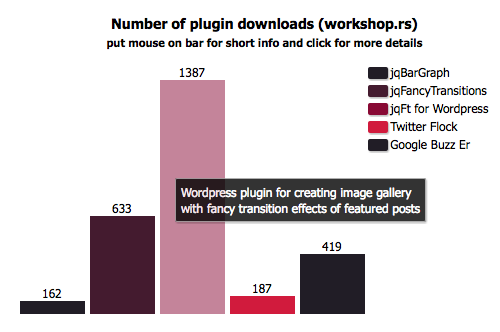
This is jqBarGraph on steroids. It have almost all jqBarGraph possibility, plus some new features, like url bars, info boxes, negative values, AJAX data loading…
Features
* You can set label, color, url and tooltip text for every bar
* Bars can be simple or stacked
* Legend can be created automatically
* Data can be loaded with AJAX and can have negative values for simple type
* Compatible with all major browsers including IE
How to use
First you should create element in which you want to create graph. It can be something like:
<div id="myGraph"></div>
After that data array must be created. There are two types available: simple and stacked.
Array for simple type should be like this and everything except value is optional:
new graphData = new Array(
[value1,label1,color1,url1,tooltip1],
[value2,label2,color2,url2,tooltip2],
.....
[valueN,labelN,colorN,urlN,tooltipN]
);
For stacked type also only value is required and everything else is optional. It should look similar to next code:
new graphData = new Array(
[[value11,value12,...,value1M],label1,color1,url1,tooltip1],
[[value21,value22,...,value2M],label2,color2,url2,tooltip2],
.....
[[valueN1,valueN2,...,valueNM],labelN,colorN,urlN,tooltipN]
);
After you create container and data, you have to create mooBarGraph object with prepared arguments.
window.addEvent('domready', function() {
var myGraph = new mooBarGraph({
container: $('myGraph'),
data: graphData
});
})
This will be enough to create bar graph based on your data, but you can pass few additional options. List of options is in next section.
mooBarGraph options
You should always have container and data options:
container // element in which you want mooBarGraph to be created
data // array of data for mooBarGraph
Other options are optional (list is shown with default values):
width: 400 // width of graph panel in px
height: 300 // height of graph panel in px
title: false // graph title. can use html tags
barSpace: 10 // space between bars in px
color: '#111111' // default color for your bars
colors: false // array of colors. it will be used for parts of stacked type or will be repeated for simple type
sort: false // 'asc' or 'desc', this can be used only for simple type
prefix: '' // string that will be show before bar value
postfix: '' // string that will be shown after bar value
legend: false // set to true if you want to lefend box be created
legendWidth: 100 // width of legend box in px
legends: false // array of values for legend
showValues: true // for stacked bars type only. false to hide values in sub bars.
showValuesColor: '#fff' // color for values in parts for stacked type
AJAX data loading
All you have to do is to call draw() function of your mooBarGraph object and pass url who will return data in JSON format.
myGraph.draw(url);
Example usage:
html
<a href="#" onclick="myGraph.draw('ajaxdata.php')>click here for new data</a>
ajaxdata.php
for ($i=0; $i<10; $i++){
$ajaxData[$i][] = rand(-5,5);
}

$ajaxData = json_encode($ajaxData);
echo $ajaxData;
The draw() function also can accept array as argument and create graph dynamically.
myGraph.draw(arrayOfData);
With all of this options you can create really cool presentation of your data as you can see on mooBarGraph demo page. If you can and want to contribute check github.
Hi,
When using a stacked type, the sum of the components is presented as float. Even if the sum is an integer.
Can I resolve this? I want the sum of the stack to be integer fi: 12 and not 12.00
I think the bug of “negative” when difference between lowest and highest value is big
can be solved by this way:
now, the barHeight is:
barHeight = (barValue == 0) ? ‘0’ : (this.options.height*Math.abs(barValue))/barMax;
but, barValueHolder may use 18px, and barLabelHolder too.
so I add:
if (barHeight < valAndLabelHeight){
barHeight = valAndLabelHeight + 1; // just 1px
}
Really cool script – the best I could find for mootools.
Thank you & Justin for the fix!
Keep it up
Cheers
I made a quick fix for the bar difference issue. This only seems to work if all of your values are positive.
Add this code to line 241 in the uncompressed file:
var barBodyHolderHeight = parseInt(barBodyHolder.getStyle(‘height’));
if(isNaN(barBodyHolderHeight)) barBodyHolderHeight = 0;
barHolder.setStyles({
height: lblvalHeight + barBodyHolderHeight,
display: ‘block’
});
This is an awesome script Lazarevic, and I’m pretty sure that if you use a little time to fix the “negative” bug, you’ll get the status of hero in some circles – yes it’s probably gonna be in the nerdy circles, but a hero you’ll be 😉
Thank you for your work, now I’ll have to attend other things within my reach. I’ll be checking this page out in the future for updates.
Greetings from Denmark.
Thanks for this great plugin!
Much easier than most graphing scripts/plugins. The json ajax loading is great!!!
Hats Off!
Hi, thanks for the great work, unfortunately I’m having the same “negative” value effect on most of my graphs which for me makes the plugin useless (for now). Hope you can have the time to look at this considering how far you’ve gone already!.
Cheers!
It’s not a matter of luck, it’s just a matter of free time : )
Any luck with that first bar difference issue?
Hi, i’m mootools dev, my project – “SegmentBox” tablegrid.
Some demos: (25-30 % from full functional)
– segmentbox.com/demo/more/admin.html
– segmentbox.com/demo/sklif/admin.html
I want to make “SegmentBox” work together with MOOBARGRAPH.
To build GRAPH from data of segmentbox tablegrid
So segmentbox tablegrid use csv structure…
“3|true|name|2,1,3|1000|2000|2010-11-21”
If you have free time, mail me…
Brennan, I know for that issue. It appears when difference between lowest and highest value is big.
Can you please help me? When I use this like so:
graphdata = new Array(
[232,’1′,,,’Month 1′],
[340,’2′,,,’Month 2′],
[497,’3′,,,’Month 3′],
[728,’4′,,,’Month 4′],
[1066,’5′,,,’Month 5′],
[1561,’6′,,,’Month 6′],
[2286,’7′,,,’Month 7′],
[3346,’8′,,,’Month 8′],
[4899,’9′,,,’Month 9′],
[7173,’10’,,,’Month 10′]
);
window.addEvent(‘domready’, function() {
var myGraph = new mooBarGraph({
container: $(‘graph’),
width: 1000,
height: 1000,
data: graphdata,
colors: [‘#5757FF’,’#5757FF’,’#5757FF’],
color: ‘#1A2944’,
legend: false,
prefix: ‘$’,
legendWidth: 150,
title: ‘Escape scenario chart’
});
})
I’m getting a wonderful graph, but the FIRST bar is about 20 pixels below, such as if it’s a negative value (but it’s not.) Why is this??
Thanks!