There are a lot of different jQuery News Ticker plugins with lot of options that you can use. Do you want to learn how to create one on your own in only 4 lines of jQuery code ?
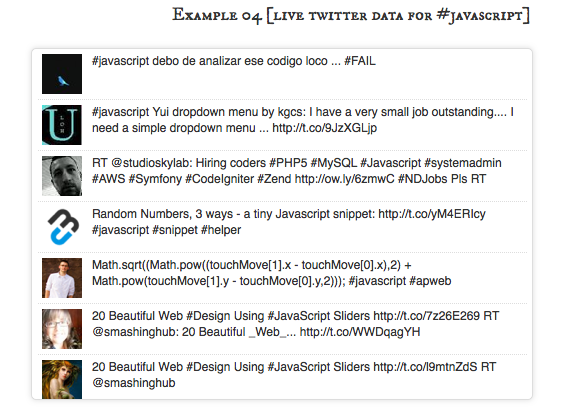
Idea is pretty simple, take first element from list, apply some disappearing effect on it and on callback attach it to the end of the list.
First we have to create HTML with list of our news, something like this:
<ul id="ticker">
    <li>
        jqBarGraph is jQuery plugin that gives you freedom to easily display your data as graphs. There are three types of graphs: simple, multi and stacked.
    </li>
    <li>
        Learn how to create image gallery in 4 lines of Jquery
    </li>
    <li>
        jqFancyTransitions is easy-to-use jQuery plugin for displaying your photos as slideshow with fancy transition effects.
    </li>
    <li>
        mooBarGraph is AJAX graph plugin for MooTools which support two types of graphs, simple bar and stacked bar graph.
    </li>
</ul>
Now, let’s put some style on this. We will set height of our visible ticker area and set overflow to hidden. If we want only one news to be visible at the time than ticker height should be the same as height of each element of the list. For more visible news at same time we just have to multiply height of each element with number of news that we want to be visible and set that as height of ticker.
#ticker {
    height: 40px;
    overflow: hidden;
}
#ticker li {
    height: 40px;
}
Of course, you can and should add more style here, but this will be enough to make your ticker to work.
Ok, we have layout set and now it’s time for make this news to start ticking. First we will create function which will apply disappearing effect on first element, append that element to the end of the list after it disappear and revert effects changes. After that, all we have to do is to call that function in desired intervals.
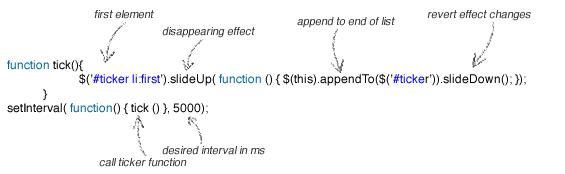
And here is plain code:
function tick(){
    $('#ticker li:first').slideUp( function () { $(this).appendTo($('#ticker')).slideDown(); });
}
setInterval(function(){ tick () }, 5000);
Of course, you can change slideUp with any other animation that you like, just don’t forget to revert effects on element after transition. Next example will set opacity to 0 for first element.
function tick(){
    $('#ticker li:first').animate({'opacity':0}, 200, function () {
        $(this).appendTo($('#ticker')).css('opacity', 1);
    });
}
setInterval(function(){ tick () }, 4000);
And please don’t forget to include jQuery at the head of your document
<script src="https://ajax.googleapis.com/ajax/libs/jquery/1.6.4/jquery.min.js"></script>
That’s it, news ticker is done. Take a look at the demo, download source code or leave a comment.
Hello,
Can we make it work on shopify?
Thanks
Very Nice and Precise…..
what you think about putting name + image + some links with discription in it..
?
thanks for sharing it
this is really helpful..and saved a lot of time for me.
Can i get Jquery for
Example 02 [3 news always visible]
just try to code, why not full style like your demo ? all fuction my copy, it’s something less
how do you make only the top one visible? I cant figure it out.
Thanks for tutor guys
easy and helpful !
tnx
Would it be easy to add a ‘next’ and ‘previous’ button/link to cycle through the list manually?
This would be handy if you see an item in the list, but didn’t read it in time before the next item is shown.
If anyone is interested, here is my working code to scroll backwards:
function tickback()
{
$(‘#ticker li:last’).animate({‘opacity’:0}, 200, function () { $(this).prependTo($(‘#ticker’)).css(‘opacity’, 1); });
}
For my site, I just used an image with a href and onclick to run each function. eg. onclick=’tick();’ to skip forward to the next item and onclick=’tickback();’ to go to previous item.
nice Article
li style= LOL comment box is censoring code!
Nevermind, figured it out. I just added the font-family tag inside ; above the individual news ticks.
Pretty sure that Joomla is not using global.css; in that case can I just use a font tag directly in the code without linking to global.css?