There are a lot of different jQuery News Ticker plugins with lot of options that you can use. Do you want to learn how to create one on your own in only 4 lines of jQuery code ?
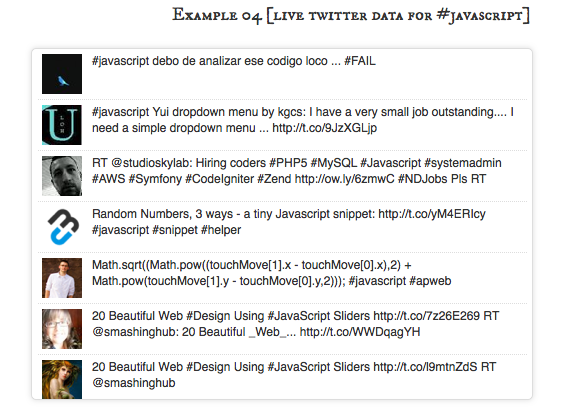
Idea is pretty simple, take first element from list, apply some disappearing effect on it and on callback attach it to the end of the list.
First we have to create HTML with list of our news, something like this:
<ul id="ticker">
    <li>
        jqBarGraph is jQuery plugin that gives you freedom to easily display your data as graphs. There are three types of graphs: simple, multi and stacked.
    </li>
    <li>
        Learn how to create image gallery in 4 lines of Jquery
    </li>
    <li>
        jqFancyTransitions is easy-to-use jQuery plugin for displaying your photos as slideshow with fancy transition effects.
    </li>
    <li>
        mooBarGraph is AJAX graph plugin for MooTools which support two types of graphs, simple bar and stacked bar graph.
    </li>
</ul>
Now, let’s put some style on this. We will set height of our visible ticker area and set overflow to hidden. If we want only one news to be visible at the time than ticker height should be the same as height of each element of the list. For more visible news at same time we just have to multiply height of each element with number of news that we want to be visible and set that as height of ticker.
#ticker {
    height: 40px;
    overflow: hidden;
}
#ticker li {
    height: 40px;
}
Of course, you can and should add more style here, but this will be enough to make your ticker to work.
Ok, we have layout set and now it’s time for make this news to start ticking. First we will create function which will apply disappearing effect on first element, append that element to the end of the list after it disappear and revert effects changes. After that, all we have to do is to call that function in desired intervals.
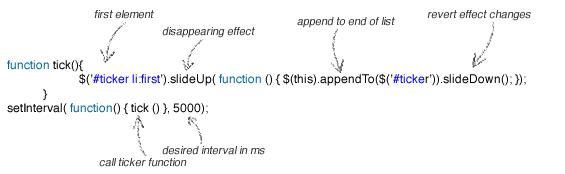
And here is plain code:
function tick(){
    $('#ticker li:first').slideUp( function () { $(this).appendTo($('#ticker')).slideDown(); });
}
setInterval(function(){ tick () }, 5000);
Of course, you can change slideUp with any other animation that you like, just don’t forget to revert effects on element after transition. Next example will set opacity to 0 for first element.
function tick(){
    $('#ticker li:first').animate({'opacity':0}, 200, function () {
        $(this).appendTo($('#ticker')).css('opacity', 1);
    });
}
setInterval(function(){ tick () }, 4000);
And please don’t forget to include jQuery at the head of your document
<script src="https://ajax.googleapis.com/ajax/libs/jquery/1.6.4/jquery.min.js"></script>
That’s it, news ticker is done. Take a look at the demo, download source code or leave a comment.
how do you make it show atleast 4 news articles? because there is only one news appearing…
Mega cool post, just what I was looking for…. 😀
Really useful post thanks,
How would you go about including the links within tweets?
Thanks in advance.
Frank, when you copy it verbatim from the blog, you get the wrong sort of a single quote mark. Just retype the ones around “#ticker li”, either as double quotes or as regular single quotes.
Abimbola and Steve – thank you!
That one doesn’t work firebug says incorrect character at
$(’#ticker li’).mouseenter(function() …..
^
I’m a java beginner, so any help would be accounted to “helping a blind”.
Frank
The last hover example by @Abimbola did not work for me. Also, I want the scroller to continue on mouseleave. Try this instead with the slideup effect:
$(‘#ticker li’).mouseenter(function() {
clearInterval(autoInterval, startTimer);
}).mouseleave(function() {
startTimer();
});
function startTimer(){
autoInterval = setInterval(function(){tick()}, 4000);
}
function tick(){
$(‘#ticker li:first’).slideUp( function () {
$(this).appendTo($(‘#ticker’)).slideDown();
});
}
startTimer();
After much fiddling, I came up with this:
$(function(){
// Source: http://workshop.rs/2011/09/news-ticker-in-4-lines-of-jquery/
//First we will create function which will apply disappearing effect on first element, append that element to the end of the list after it disappear and revert effects changes. After that, all we have to do is to call that function in desired intervals.
startTimer();
$(‘#ticker’).hover(function(){clearInterval(autoInterval);}, startTimer);
});
var startTimer = function(){
autoInterval = setInterval(function(){tick()}, 3000);
};
var tick = function(){
$(‘#ticker li:first’).animate({‘opacity’:0}, 200, function () { $(this).appendTo($(‘#ticker’)).css(‘opacity’, 1); });
}
Good work! I put it to test and worked well. However, is there a way we can make it stop on mouseover.
Thanks again
Great code… Thanks alot.
Twitter news does not show up in IE 9. Can anyone help me out?
great one, I just found one more ticker which uses no jquery just CSS3
Future of CSS3 is at our doors, why not use it?
http://webstutorial.com/css3-news-ticker-css3-notification-bar-stackexchange/css3
Thank you very much , Man , works fine with 3500 MSeconds :).
a “stop scroll link” is less intuitive than an hover stop (most commonly seen).
@kaviarasankk If you have five and you only want to show 3 and the ability to see all of them just put a link to “all news” with a webpage for that.
Really nice and short, the only thing missing is the pause on hover. May be you could suggest me a link to add that?
Thank you, your code it’s fantastic!
Just a question…
Is it possible to insert a link with a stop scroll?
If yes, how to make it?
Thank you in advance.
Fabri
Good yaar
but if i m having some 5 news to scroll
and i wanna show only 3 news and thr should be one button below “view all” onclicking it should show all the 5 news and it should toggle regardly can u
exactly what i need !
Thanks a lot
Best code ever.
opps – I didn’t copy all the code. Now it looks great. Sorry! And Thanks again!
Hi – thanks for this. It looks and works beautifully in Chrome, but is choppy and annoying in IE. Any suggestions?
sorry guys am new to these languages, in which position should put the codes? I have tried it and it does not work .. thanks a lot for the answer
It is really cool, I will try it on my blog. Actually I want to learn this all.
Very cool. I needed to be able to do just this and it’s great that I didn’t have to reinvent the wheel. One observation: you can make the code even more compact—instead of passing an anonymous function to setInterval, just pass the name of the function you want to call:
setInterval(tick, 5000);
Really “compact” code, thank you 😉