I like experiment with data visualization on client side. For that purpose, of course, I need some data for development phase. Since that development phase means that something constantly change, I had to find a way to make my life easier. That’s why I wrote a group of JavaScript range functions which helps me to create array of different types and formats of data really fast.
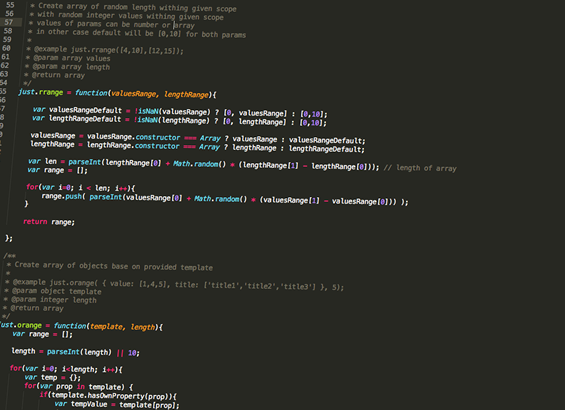
I just had to put them in some namespace, so “just” was good enough. Coincidentally, JUST can be acronym for JavaScript Useful Stuff, so I’ll probably use it more in the future. I’m still looking word for T, so any suggestion is welcome.
For now, there are 4 functions, arrayShuffle, range, rrange and orange.
just.arrayShuffle
This one should be pretty intuitive since it just shuffle your array. Shuffle algorithm is Fisher-Yates which is common for this task. It receive only one argument which is array and returns shuffled array.
just.range
Range function accept 3 parameters, start, end and step returns array of integer values. First value of array will be start parameter and each next will be incremented by given step until it reach value of end. Similar as Python range function.
just.range(4,15,2);
will return:
[4,6,8,10,12,14]
just.rrange
Random range returns array of random length between given scope where each value of array is random integer between custom scope.
just.rrange([10, 150], [5,10]);
This will return array of 5-10 elements where each value is between 10-150 eg.
[12, 99, 29, 136, 71, 100]
just.orange
This one also returns array, but values are not integer. It will return array of objects created from provided template. It accepts template with values from which new object will be created and number of objects that should be created. It’s the best to explain on example:
// prepare template
 var template = {
    value: [10,1,2],
    name: ['ten ','one','two']
 }

// create array of 3 elements based on template
just.orange(template, 3);
And this will create array of object who will look like this:
[
	{
		value: 10,
		name: 'ten'
	},
	{
		value: 1,
		name: 'one'
	},
	{
		value: 2,
		name: 'two'
	}
]
REAL LIFE EXAMPLE
Recently I started to work on tutorial for creating animated bar graphs and I needed data for testing. I wanted to test how it will look like with random number of elements and with random values. So, I just combine methods described above.
var template = {
	title: just.arrayShuffle(['CSS','JAVASCRIPT','HTML','PHP','MYSQL']),
	value: just.rrange([50,100],[3,20]),
	color: just.arrayShuffle(['#0099FF', '#91D6BC','#E83A25','#DE70A0','#9900FF'])
}
var dataArr = just.orange(template, 3 + Math.random() * 20 );
And I got something like this, so I can iterate and draw graph bars.
[
	{
		color: "#91D6BC",
		title: "HTML",
		value: 54
	},
	{
		color: "#DE70A0",
		title: "PHP",
		value: 81
	},
	{
		color: "#9900FF",
		title: "MYSQL",
		value: 65
	},
	{
		color: "#E83A25",
		title: "JAVASCRIPT",
		value: 70
	}
]
This approach will not be so great for large amount of data. For larger datasets each element should probably be created dynamically when we need it. It should be great if we could use JavaScript Generators for that purpose, but for now they are part of JavaScript 1.7 which is supported in FireFox only.
Printing technology has come a long way in a short period of time.
Apart from the wireless functionality the most important thing to consider is the DPI of the printer (dots
per inch) you can usually rely on this to tell you how good a print you
will get. To sum up this Brother wireless printer HL2270DW Monochrome Printer review, it can definitely be classified as
among the top choices for printers.
Javascript Useful STuff
___________^___________
Sorry, the leading spaces got me again LOL
JUST works just fine without another word…
Javascript Useful STuff
^
It’s an asymmetric Acronym, aka dynamically balanced in motion 😉 It is balanced because the ‘J’ is far from the fulcrum!
Hey the Twang visualizer was a cool idea, I assume that the three colors represent follow-only, followed-only and follow&followed (aka connections?) I fiddled a bit but I still haven’t got the hang how to change which set of circles.
All the best to you sir!
Just nice for school project.
JUST: javascript: useful set of tools