Twitter Flock is WordPress plugin for showing multiple accounts tweets with different color scheme for every account. Also, there are setting allowing you to control how your tweets will look like and will they cache or not.
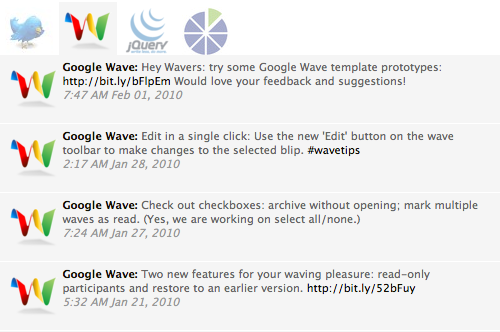
One of the things that make this plugin different form other are tabs above Twitter Flock box. This tab shows accounts avatars so visitors can click on them and see only tweets from that account. From 1.1 version Twitter Flock have sidebar widget.
With Twitter Flock you can:
– show tweets from multiple accounts or only one account,
– cache tweets for faster page load,
– set different color scheme for every user,
– show only tweets with defined hash tag,
– link url inside of tweets,
– display tab with accounts avatars so visitors can select which account tweets wants to see,
– easy implement as sidebar widget,
– custom header title
You should follow those steps in order to install Twitter Flock on you WordPress:
1. Upload `twitter-flock` directory to the `/wp-content/plugins/` directory
2. Activate the plugin through the ‘Plugins’ menu in WordPress
3. Add this <?php include (ABSPATH . ‘/wp-content/plugins/twitter-flock/twitter-flock.php’); ?> in header of your template
4. Put <?php TwitterFlock(); ?> in your template on place where you want Twitter Flock to show tweets or
5. Drag widget on your sidebar
6. Set options on admin panel
Twitter Flock, beside standard options, have and some not-so-standard features.
My favorite feature and main reason why I made this plugin is possibility to show only tweets with chosen hash tag and remove that hash tag from tweets. So, now on workshop.rs I can show only those tweets that I select with #ws hash tag and I will not bother you with rest of my tweets.
Another cool feature is tab bar above Twitter Flock box so your visitor can choose only tweets from selected account. Also, you can choose different colors for background and text for every user separately.
Changelog
1.2
* Header title
* Option for exclude jQuery in case of conflict
1.1
* Sidebar widget
* No need for inlude line in header
* Fixes problem with new avatar appereance
Kroon
Guinea-Bissau
Do not use this plug-in; whether it’s with issues with new Twitter API, or because of something else, this plug in will WRECK your WordPress site. I spent 45 minutes with my hosting company (Hostgator) trying to get my site back up and running (it will create an internal server error from a corrupt HT Access file and force you to disable all plugins before you can restore).
Hostgator said they’ve encountered 4-5 other instances of this problem with Twitter Flock and are considering posting an advisory to clients.
It’s bad – if you don’t have good support or solid skills, this could kill your site.
Hi,
Thank you for the great plugin!
Yesterday I noticed that latest twits were not showing. I thought that the maximum amount of twits was reached so I increased the number, but it didn’t help. Checked all settings, but still don’t see what the problem might be. Do you know where I should look for the problem?
Thank you,
Katya
I installed twitter flock 2 weeks ago. It worked flawlessly.
Today I noticed that my entire web site did not load. It looks like there has been an issue at my provider and they had to restore the drive. I suddenly had old plugins/files back and new plugins/files were gone.
I reinstalled the new plugins (including twitter flock) but when I enable twitter flock the entire web site stopped working.
I’m not able to get twitter flock working again on my site.
(I also noticed that twitter api v1 is no longer supported by Twitter but as I did not need to enter a secret key I expect twitter flock does not use that, and anyway, that was already a few days back).
Same problem as Suzanne, guess I’ll have to find the widget she was talking about.
Nevermind, I couldn’t get it working or get help to fix it so I went with a different plugin that works. Thanks anyway.
Hi, I love twitter flock but it has up and quit working. I get the error –
Warning: date() expects parameter 2 to be long, string given in /home/xxxxxx/public_html/xxxx.com/wp-content/plugins/twitter-flock/twitter-flock-content.php on line 272
Nothing on my site has changed and I have not changed the settings on the plugin. How can I fix this error?
Thanks
After checking out a few of the blog posts on your website, I seriously like your technique of writing a blog.
I book marked it to my bookmark website list and will be checking back soon.
Please check out my website too and tell me how you feel.
I installed the plugin and configured and then placed it on the right sidbar. Nothing shows up expept and empty box and the twitter logo.
FYI, the plugin only allows the widget to appear in one sidebar, strangely. Once I drag it to a sidebar it removes itself from the available widgets.
I am currently using a Twitter widget on my website to post tweets about weather. However, the widget that I have can only be keyed or programmed to allow the display of one hashtag at a time. Currently, the hashtag selected is: #okwx which means we are posting only those tweets dealing with Oklahoma weather. However, we would like to have a widget that allows for the posting of multiple hashtags, such as #txwx for Texas, #cowx for Colorado, #kswx for Kansas, etc. Will your widget help us meet our need?
Great post. I was сhecking conѕtantlу this blog and
I’m impressed! Extremely helpful info particularly the last part 🙂 I care for such information much. I was looking for this certain info for a long time. Thank you and good luck.
I’ve done what you suggested but still got the problem, now that appears:
“Warning: date() expects parameter 2 to be long, string given in /home/vip022/public_html/wp-content/plugins/twitter-flock/twitter-flock-content.php on line 271:
Warning: date() expects parameter 2 to be long, string given in /home/vip022/public_html/wp-content/plugins/twitter-flock/twitter-flock-content.php on line 271”
Please help us how this problem can be solved, thanks.
Keep this gοіng pleasе, great job!
Appreciate the recommendation. Let me try it out.
Love your widget but is there any way to filter out any conversations and just keep individual posts?
And I give a plus thing. In order to validate HTML I change the line 196 of twitter-flock-content.php:
$img = “”;
Regards.