Yesterday Google announced new service, Google Buzz, a new way to share updates, photos, videos and more, and start conversations about the things you find interesting. Today you can have Google Buzz posts on your WordPress site.
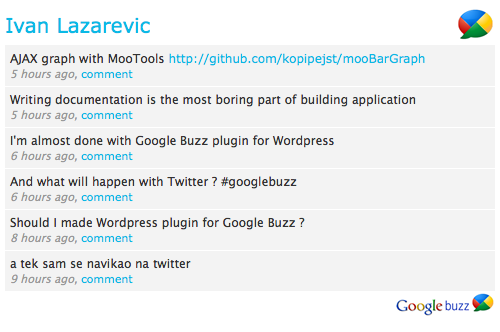
Google Buzz Er is WordPress plugin for showing public Google Buzz posts for selected Google account. All you have to do is to set Google account username and optionally number of posts. From 1.2 version Google Buzz Er have sidebar widget.
Features
* Custom title
* Showing images from post
* Sidebar widget
* Custom color scheme
How to install
In header of your site add following line of code:
<?php include (ABSPATH . '/wp-content/plugins/google-buzz-er/google-buzz-er.php'); ?>
1. Upload google-buzz-er to the /wp-content/plugins/ directory
2. Activate the plugin through the ‘Plugins’ menu in WordPress
3. Drag widget on your sidebar – or –
On place where you want Google Buzz ER to be shown put:
<?php GoogleBuzzEr(); ?>
After that go on Google Buzz ER settings page and set your Google account username (without ‘@gmail.com’) . It’s simple like that.
Changelog
1.1
* Sorting posts by publishing time
1.2
* Added sidebar widget feature
* Removed include for header section
1.3
* Custom title in header
* Option for showing images from posts
* Width for images from posts
1.4
* Using curl for getting Google Buzz data
* Check if there are posts
* Set box, posts, links color from admin page
* Choose if Google Buzz logos will be displayed
Каждому Привет! Заходите на SergTovar SergTovar – Первый интернет магазин автонаполняющихся сайтов для заработка. Постоянным покупателям скидки. Партнёрская программа.
заработок в интернете Самый достойный заработок в интенете
a real way to earn money online реальный способ заработать в интернете how to earn money on the affiliate program способ заработать на партнерской программе
a real way to earn money online реальный способ заработать в интернете how to earn money on the affiliate program способ заработать на партнерской программе
I love the plugin, and it was working well for a while, but then I, too, started getting the “Invalid argument supplied for foreach()” error. I’ve used my profile url number (102843017746602461910) as well as my gmail username, but I still get the error.
Any suggestions would be appreciated. Thank you.
This widget works nicely also with 3.0.5
Thanks
Is there a way to post every buzz as a wp post?
Thanks for you help!
thank you 4 share
Hi, I’m trying to do the same thing, showing my public Google Buzz on my website but I can’t manage to get the images. I’m doing it with simplepie. Any ideas? Thanks in advance!
ok,I got it
should use gmail ID as the google profile URL name
that’s it
Hi
I always got this warning,so what I should do?
Warning: Invalid argument supplied for foreach() in /var/www/wp-content/plugins/google-buzz-er/google-buzz-er-content.php on line 149
thank you !